Keeping track of TLS certificates spread across multiple Vault PKI engines can quickly become tedious: expirations are missed, renewals become reactive, and teams lose visibility.
VCV (VaultCertificatesViewer) is a small, self-hosted web application that gives you a clear, fast overview of your Vault-issued certificates—so you can act before incidents happen.
What problem does VCV solve?#
Organizations using HashiCorp Vault often deal with:
- Multiple Vault instances and environments
- Several PKI mounts
- Certificates expiring at different rates and locations
- The need for a simple interface without heavy tooling
VCV focuses on the essential: visibility and clarity.
What you get#
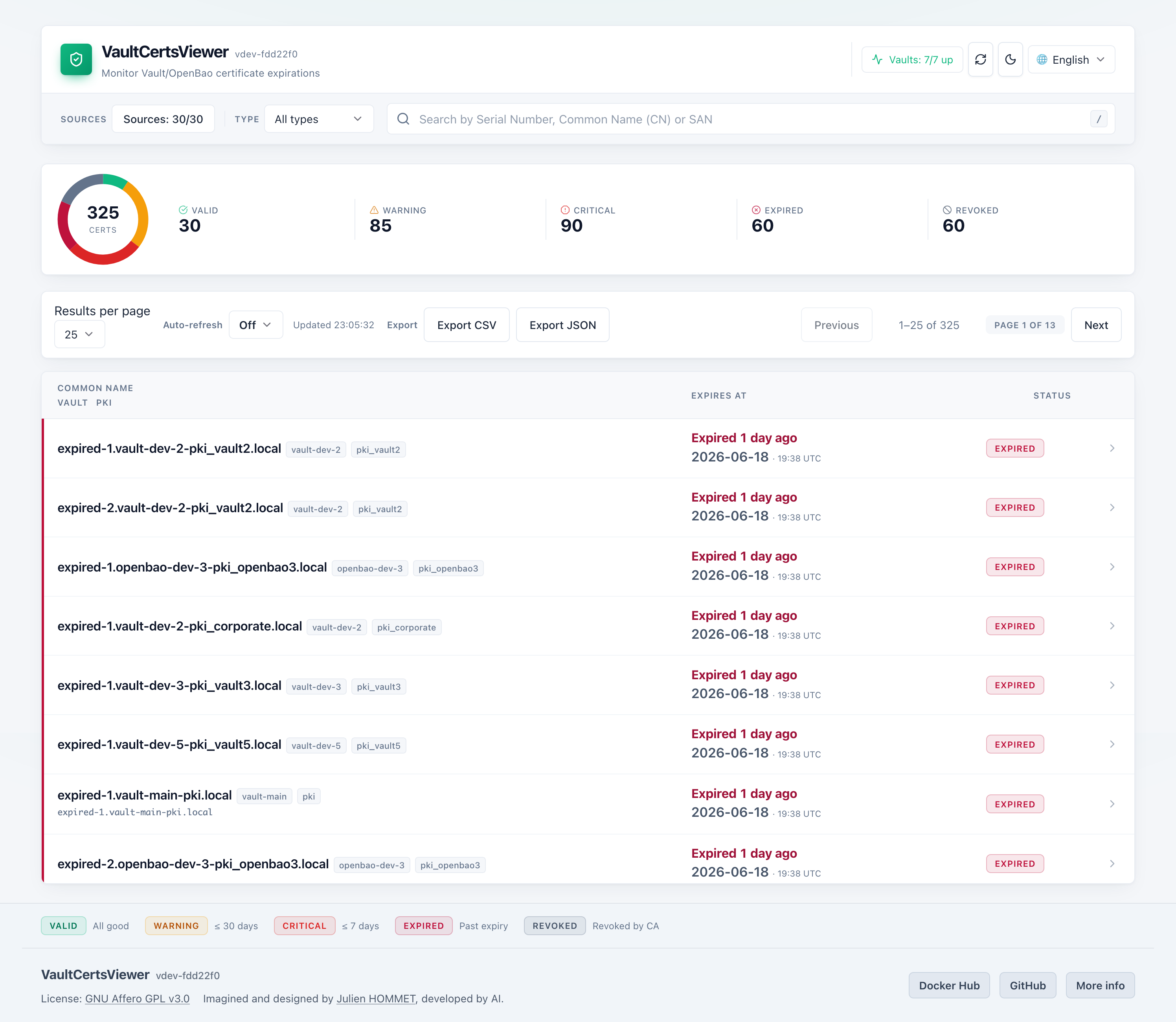
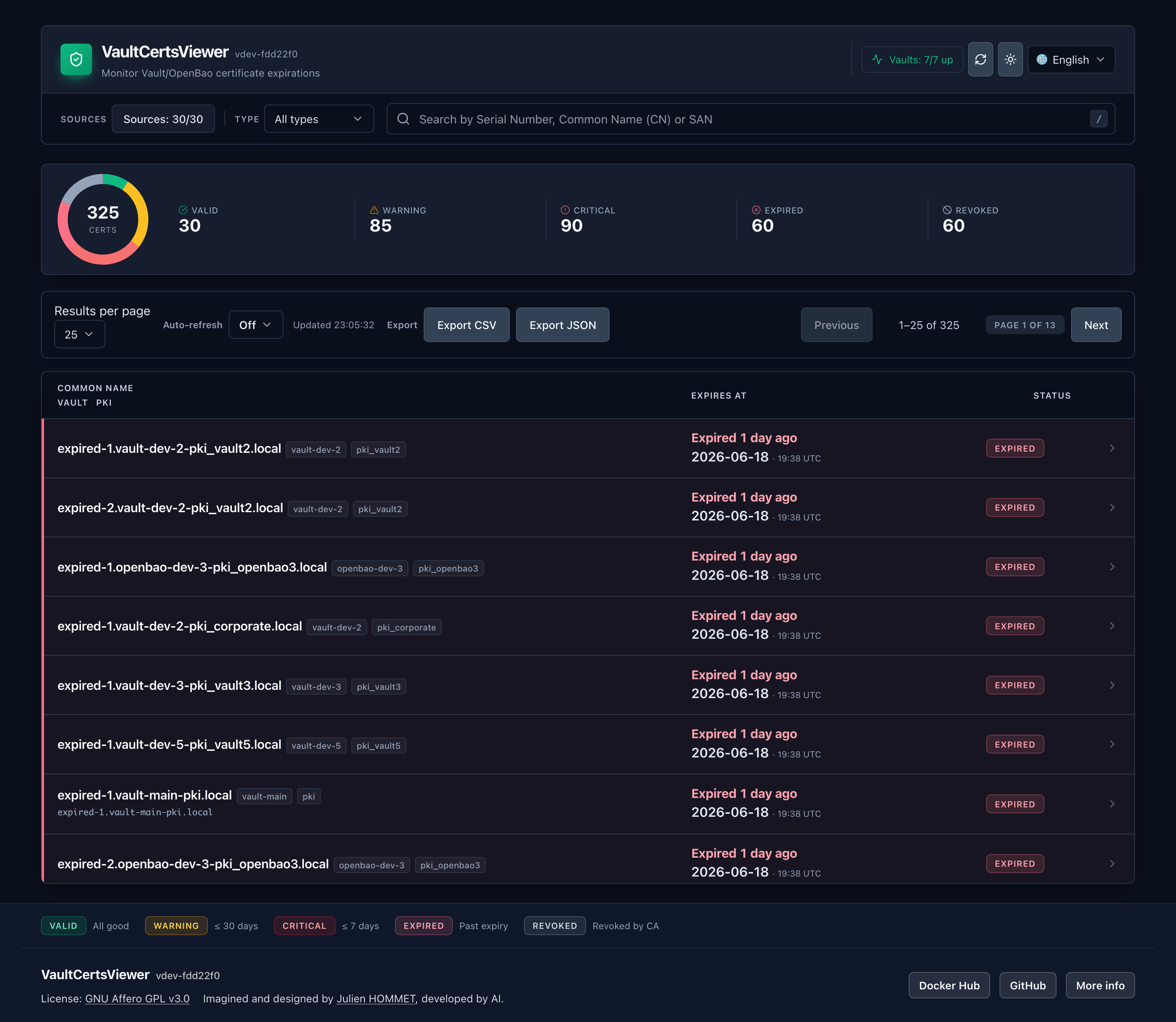
A clean certificate inventory#
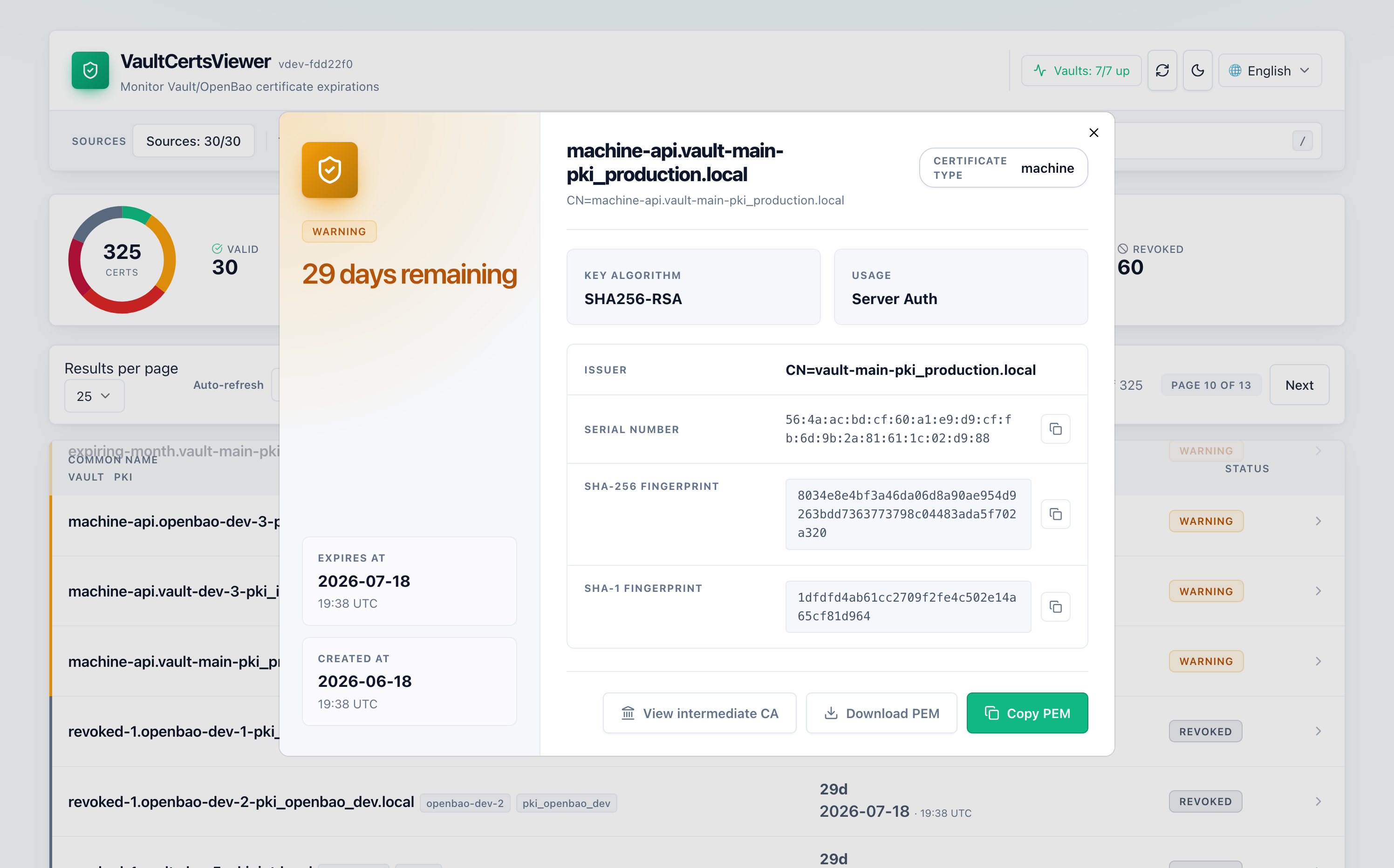
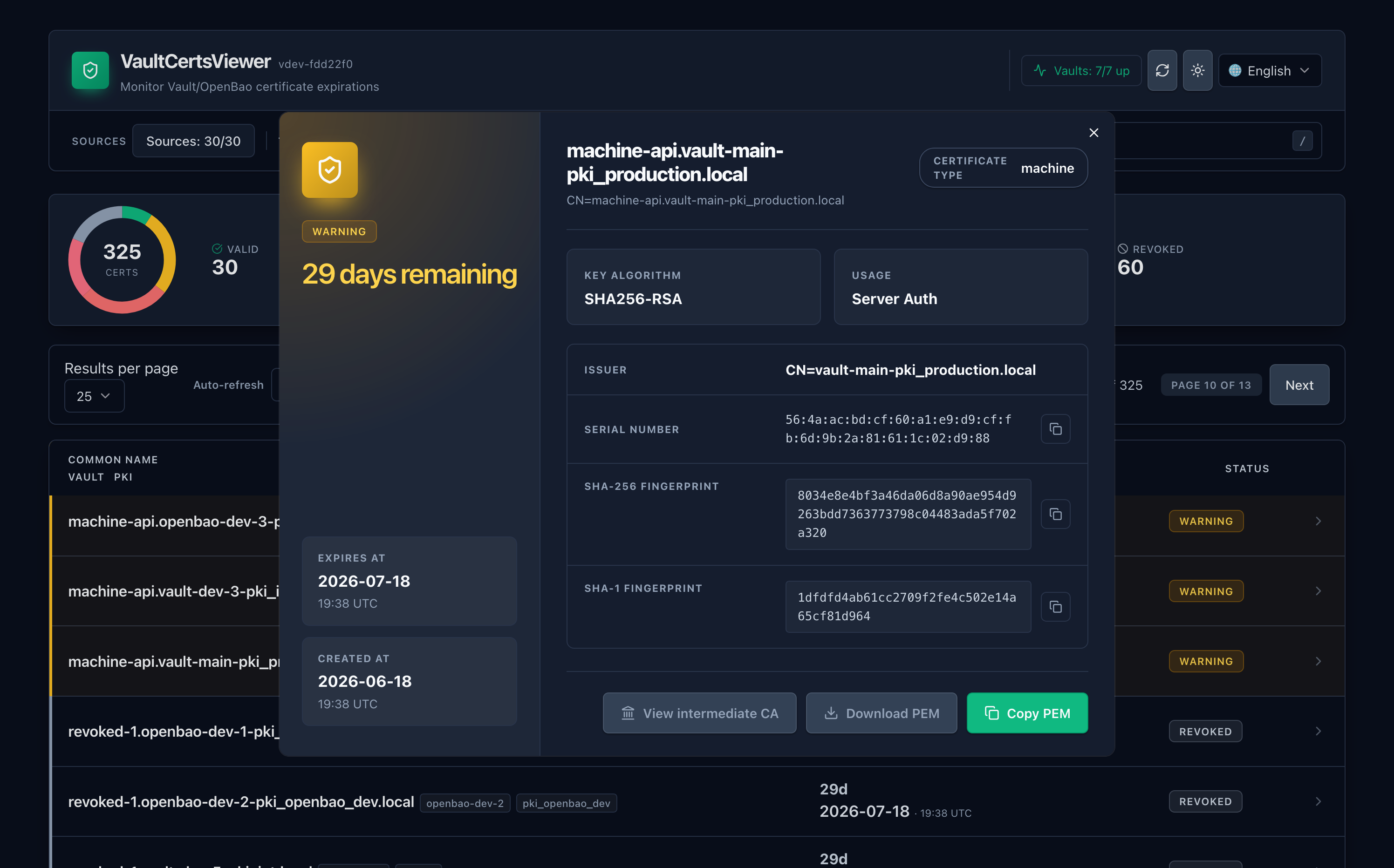
VCV lists certificates issued by your Vault PKI engines with the details you actually need:
- Common Name (CN)
- Issuer / mount source
- Expiration date (the most needed)
- Remaining days
- Status (revoked, expired, valid)
The goal is to let you answer quickly:
- “Which certificates expire soon?”
- “Which PKI mount is producing the most short-lived certs?”
- “Are we safe for the next X days?”
Expiration thresholds you can configure#
Different environments have different risk tolerance. VCV supports configurable expiration thresholds (for example: warning at 30 days, critical at 7 days), allowing you to match your operational policy without changing code.
A simple, responsive web UI#
VCV is designed to be:
- Easy to run (self-hosted)
- Fast to navigate
- Accessible for operators
No complex setup, no unnecessary dependencies—just the dashboard.
Metrics-ready (for monitoring & alerting)#
VCV exposes metrics so you can integrate it into your monitoring stack (e.g., Prometheus or VictoriaMetrics). That means you can build alerts such as:
- “Certificates expiring in < 7 days detected”
- “Vault connectivity issue”
- “Last successful fetch too old”
How it fits into your workflow#
VCV is not trying to replace Vault or your monitoring stack. It complements them:
- Vault remains the source of truth
- VCV makes the data easy to consume
- Prometheus/Alertmanager (or similar) can alert on the exported signals
In practice, teams use VCV as:
- A daily/weekly check dashboard
- An incident-prevention tool
- A quick troubleshooting view when Vault PKI is under scrutiny
Who is it for?#
VCV is ideal if you are:
- Running Vault PKI in one instance or at scale
- Managing multiple PKI mounts
- Supporting many internal services with short-lived certificates
- Looking for a lightweight UI to help spot issues early
Application screenshots#
Why VCV is intentionally “small”#
Many certificate management platforms grow into full-blown ecosystems. VCV intentionally stays focused:
- Minimal operational complexity
- Easy to deploy and update
- Clear UI and direct value
If you already trust Vault for PKI, VCV helps you trust your visibility.
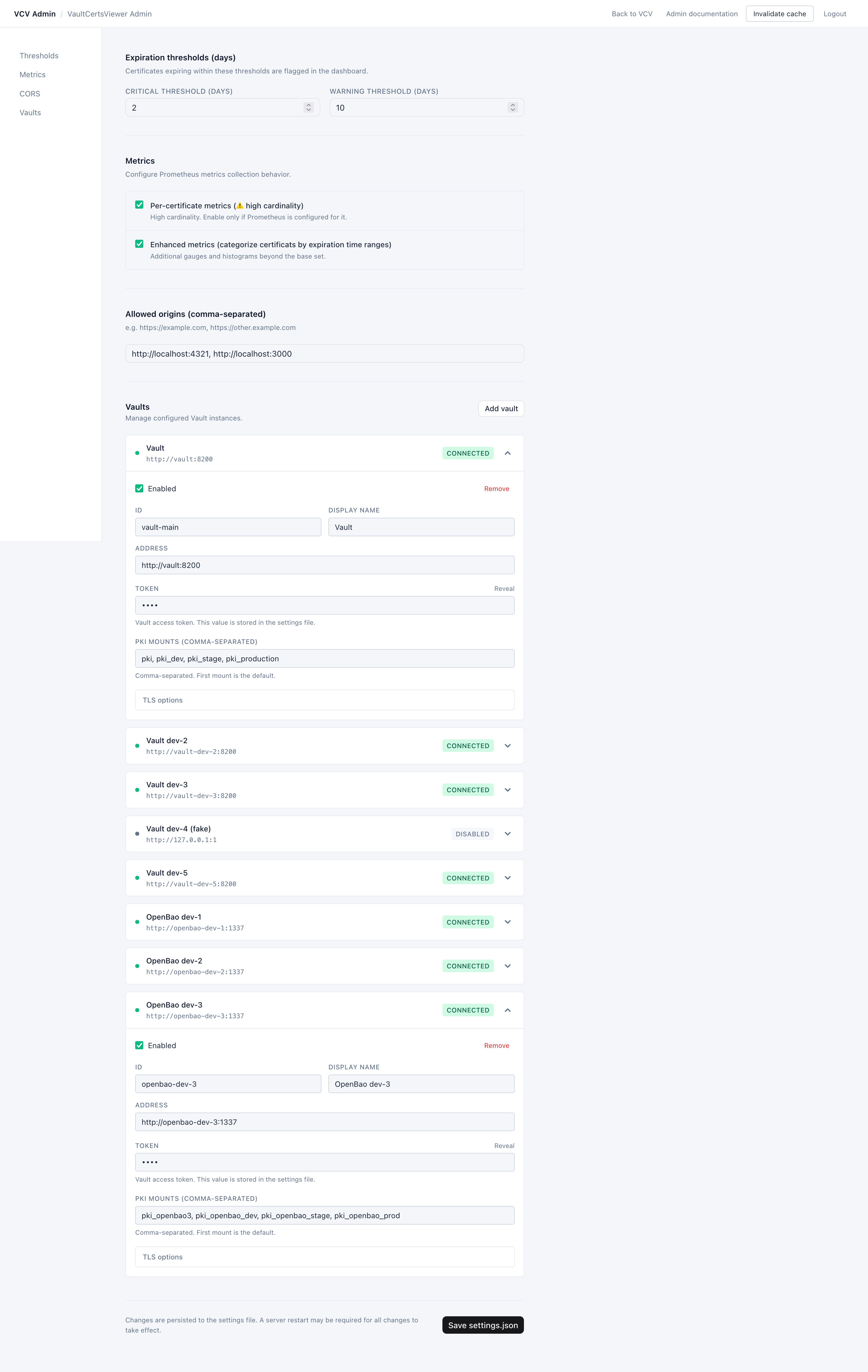
An administration page#
VCV is designed to be simple to operate: administrators configure how the application connects to Vault (addresses and authentication), choose which PKI mounts are visible, and tune expiration thresholds to match the organization’s policy.
The administration page is a multi-form password-protected area where you can set the endpoints for your Vaults. All information will be stored in a JSON file.
VCV does not aim to replace Vault governance—access control and secret management remain enforced by Vault—so the main admin focus is safe configuration, observability, and regular credential rotation.
Deployment with Docker#
Requirement#
Configuration of VCV are stored in a file settings.json. You need to create this file before start the container.
Create the file settings.json in the workdir, and type these informations with your values:
{
  "admin": {
    "password": "$2y$10$.changeme"
  },
  "app": {
    "env": "prod",
    "logging": {
      "level": "debug",
      "format": "json",
      "output": "both",
      "file_path": "/var/log/app/vcv.log"
    },
    "port": 52000
  },
  "certificates": {
    "expiration_thresholds": {
      "critical": 2,
      "warning": 10
    }
  },
  "metrics": {
    "per_certificate": true,
    "enhanced_metrics": false
  },
  "cors": {
    "allowed_origins": [
      "https://172.16.20.50:8443",
      "https://reproxy.vcv.local"
    ],
    "allow_credentials": true
  },
  "vaults": [
    {
      "id": "vault-main",
      "address": "http://vault:8200",
      "token": "root",
      "pki_mounts": ["pki", "pki_dev", "pki_stage", "pki_production"],
      "display_name": "Vault",
      "tls_ca_cert_base64": "BASE64_PEM_CA_BUNDLE",
      "tls_ca_cert": "",
      "tls_ca_path": "",
      "tls_server_name": "vault.service.consul",
      "tls_insecure": true,
      "enabled": true
    },
    {
      "id": "vault-dev",
      "address": "http://vault-dev:8200",
      "token": "root",
      "pki_mounts": ["pki", "pki_corporate", "pki_external", "pki_partners"],
      "display_name": "Vault dev",
      "tls_ca_cert_base64": "BASE64_PEM_CA_BUNDLE",
      "tls_ca_cert": "",
      "tls_ca_path": "",
      "tls_server_name": "vault-dev.service.consul",
      "tls_insecure": true,
      "enabled": true
    }
  ]
}
Rapid launch with docker run#
Type this command to launch a vcv container:
docker run -d \
  -v "$(pwd)/settings.json:/app/settings.json:rw" \
  -v "$(pwd)/logs:/var/log/app:rw" \
  --cap-drop=ALL --read-only --security-opt no-new-privileges:true \
  -p 52000:52000 jhmmt/vcv:1.8
Using a docker-compose file#
Create the file docker-compose.yml and type these information:
---
services:
  vcv:
    image: jhmmt/vcv:1.8
    container_name: vcv
    restart: unless-stopped
    ports:
      - "52000:52000/tcp"
    cap_drop:
      - ALL
    read_only: true
    security_opt:
      - no-new-privileges:true
    volumes:
      - ./settings.json:/app/settings.json:rw
    deploy:
      resources:
        limits:
          cpus: "0.50"
          memory: 64M
Deployment in Kubernetes#
Because of the one-binary image, VaultCertsViewer can be deployed into a Kubernetes cluster. Here is the manifest:
apiVersion: v1
kind: Namespace
metadata:
  name: vcv
---
apiVersion: v1
kind: ServiceAccount
metadata:
  name: vcv-sa
  namespace: vcv
---
apiVersion: apps/v1
kind: Deployment
metadata:
  name: vcv
  namespace: vcv
  labels:
    app: vcv
spec:
  replicas: 1
  selector:
    matchLabels:
      app: vcv
  template:
    metadata:
      labels:
        app: vcv
    spec:
      serviceAccountName: vcv-sa
      securityContext:
        runAsNonRoot: true
        runAsUser: 1000
        fsGroup: 1000
      containers:
        - name: vcv
          image: jhmmt/vcv:1.8
          imagePullPolicy: IfNotPresent
          ports:
            - name: http
              containerPort: 52000
              protocol: TCP
          volumeMounts:
            - name: vcv-settings
              mountPath: /app/settings.json
              subPath: settings.json
              readOnly: true
          resources:
            requests:
              cpu: "100m"
              memory: "64Mi"
            limits:
              cpu: "500m"
              memory: "128Mi"
          readinessProbe:
            httpGet:
              path: /api/ready
              port: http
            initialDelaySeconds: 5
            periodSeconds: 10
          livenessProbe:
            httpGet:
              path: /api/health
              port: http
            initialDelaySeconds: 10
            periodSeconds: 20
          securityContext:
            readOnlyRootFilesystem: true
            allowPrivilegeEscalation: false
      volumes:
        - name: vcv-settings
          secret:
            secretName: vcv-settings
---
apiVersion: v1
kind: Secret
metadata:
  name: vcv-settings
  namespace: vcv
type: Opaque
stringData:
  settings.json: |
    {
    "admin": {
        "password": "$2y$10$.changeme"
    },
    "app": {
        "env": "prod",
        "logging": {
        "level": "debug",
        "format": "json",
        "output": "both",
        "file_path": "/var/log/app/vcv.log"
        },
        "port": 52000
    },
    "certificates": {
        "expiration_thresholds": {
        "critical": 2,
        "warning": 10
        }
    },
    "metrics": {
        "per_certificate": true,
        "enhanced_metrics": false
    },
    "cors": {
        "allowed_origins": [
            "https://172.16.20.50:8443",
            "https://reproxy.vcv.local"
        ],
        "allow_credentials": true
    },
    "vaults": [
        {
        "id": "vault-main",
        "address": "http://vault:8200",
        "token": "root",
        "pki_mounts": [
            "pki",
            "pki_dev",
            "pki_stage",
            "pki_production"
        ],
        "display_name": "Vault",
        "tls_ca_cert_base64": "BASE64_PEM_CA_BUNDLE",
        "tls_ca_cert": "",
        "tls_ca_path": "",
        "tls_server_name": "vault.service.consul",
        "tls_insecure": true,
        "enabled": true
        },
        {
        "id": "vault-dev",
        "address": "http://vault-dev:8200",
        "token": "root",
        "pki_mounts": [
            "pki",
            "pki_corporate",
            "pki_external",
            "pki_partners"
        ],
        "display_name": "Vault dev",
        "tls_ca_cert_base64": "BASE64_PEM_CA_BUNDLE",
        "tls_ca_cert": "",
        "tls_ca_path": "",
        "tls_server_name": "vault-dev.service.consul",
        "tls_insecure": true,
        "enabled": true
        }
    ]
    }
---
apiVersion: v1
kind: Service
metadata:
  name: vcv
  namespace: vcv
  labels:
    app: vcv
spec:
  selector:
    app: vcv
  ports:
    - name: http
      port: 52000
      targetPort: http
      protocol: TCP
  type: ClusterIP
Following this installation, you will need to use your Gateway and create the necessary HTTPRoute to access the app from outside the Kubernetes cluster.
Conclusion#
Certificate expiration is a predictable risk—yet it’s still a common cause of outages.
VCV makes it easier to track, prioritize, and act early by providing a simple view of certificates across Vault PKI engines, with configurable thresholds and monitoring-friendly metrics.
 Bluesky
 Reddit
 X
X
 LinkedIn